

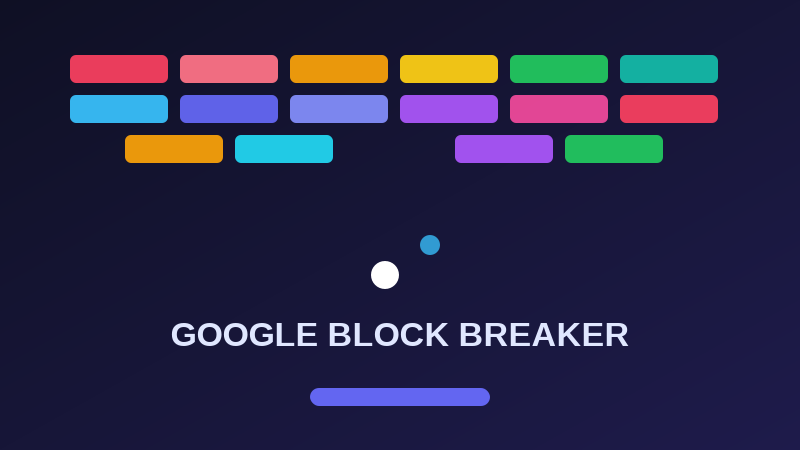
Google Block Breaker
Google Block Breaker
Having trouble loading? Retry the game or use another option below.
Play next

Google Block Breaker
- Rating:
- Not rated yet
- Platform:
- Browser
Google Block Breaker brings the timeless thrill of retro arcade brick-smashing straight into a crisp 60 FPS neon stage built right into this site. Every shot challenges you to read bounce geometry cleanly: hitting near the center of your paddle sends the ball straight back upward, whereas catching it on either outer edge whips sharp diagonal shots up behind stubborn armored brick rows. Six distinct stage formations ramp from open starter walls to split fortress shields.
Gameplay: Google Block Breaker
High-score runs come alive once glowing power-up capsules begin tumbling from shattered bricks. Catching M splits your shot into simultaneous multi-ball chaos that melts entire formations in seconds, W stretches your paddle for forgiving saves, and S lights up an energy floor barrier across the bottom edge. Chaining consecutive brick hits without touching the paddle climbs your combo multiplier up to 5x for rapid score surges.
Show moreShow less
Key features of Google Block Breaker
Self-hosted 60 FPS canvas
Zero third-party lag or pop-ups—launches instantaneously inside your browser.
Multi-ball, wide & shield drops
Catch M, W, and S capsules to multiply firepower and guard tricky rebounds.
Six retro pixel formations
Progress through six escalating layouts featuring double-hit armored bricks.
How to play Google Block Breaker
Click Play above to open the self-hosted Retro Neon Breakout canvas immediately without external redirects. Move your paddle smoothly with your mouse pointer, finger drag, or Arrow and A/D keys, then click the stage or press Spacebar to release the opening ball. Carve a side tunnel early so the ball traps itself above the top row and clears heavy bricks automatically while you position underneath falling M, W, and S power-ups.
Launch the ball
Click Play above, then click inside the neon canvas or press Spacebar.
Aim with paddle edges
Strike the ball off the outer third of your paddle to open steep side tunnels.
Prioritize power-ups safely
Track the main ball first before lunging for falling M, W, or S drops.
Controls and device notes
| Action | Input | Notes |
|---|---|---|
| Move paddle | Mouse movement, touch drag, Left/Right Arrows, or A/D | Mouse and touch offer instant precision across the full 800px width. |
| Launch / restart | Left Click, Spacebar, or Reset button | Releases the ball or resets all six stages cleanly. |
Desktop
Mouse steering provides pixel-exact paddle placement for aiming steep edge bounces and juggling multi-ball waves.
Mobile & touch
Drag one finger horizontally across the lower canvas on touch devices; landscape orientation makes bricks larger.
Practical tips and mistakes to avoid
- Punch a narrow gap up either side wall first so the ball bounces rapidly across the ceiling.
- Do not sacrifice your last active ball just to chase a risky power-up capsule on the far side.
- Use the outer tip of your paddle to steer straight vertical bounces into sharper angles.
- Keep your paddle near the center during multi-ball chains so you can react to whichever ball drops lowest.
Who might enjoy Google Block Breaker?
Google Block Breaker offers instant browser arcade sessions with crisp controls, zero installs, and immediate replayability.
Why use this game page?
Player-first layout
The player and its loading status stay above the guide. Site advertisement slots are separate from the game controls.
Practical context
Use the contents links to find input instructions, device limitations and available game-specific notes without losing this page.
A relevant next step
Compare category and topic links, then choose another named game from the recommendations.
For a wider choice, browse the full browser-game catalog. A provider may apply its own cookies, ads or restrictions; read our privacy notes.
Questions about Google Block Breaker
How do you unlock multi-ball in Google Block Breaker?
Shatter glowing bricks and catch falling red M capsules with your paddle to split into extra balls.
What do the W and S power-ups do?
Green W widens your paddle temporarily, while blue S raises a bottom safety shield that bounces stray balls back upward.
How many stages are included?
There are six progressive retro formations featuring staggered layouts and reinforced two-hit bricks.
Does Google Block Breaker work on phones and Chromebooks?
Yes. The self-hosted HTML5 canvas runs smoothly with touch drag, mouse, or keyboard on any modern browser.
Game provider
About Block Breaker Game & game guides
Start with Google Block Breaker
Launch the neon ball, angle crisp paddle rebounds, and catch multi-ball, wide-paddle, and shield drops across 6 retro brick formations. Explore controls below or browse 11 more verified browser arcade games.
Read the Google Block Breaker guide and controls before you begin.
Browse by category
Explore the catalog →Guides and comparisons
All guides →Compare named games and follow the contextual links back to their play pages.
Google Block Breaker strategy: side tunnels, edge angles, and multi-ball
Master paddle edge aiming, ceiling tunnels, and M/W/S power-up priority to clear all six Retro Neon Breakout stages with higher combo multipliers.
Crossy Road vs Flappy Bird 2 vs Bottle Jump: picking your arcade rhythm
Compare timing rhythms across Crossy Road, Flappy Bird 2, and Bottle Jump—from four-way highway hopping to gravity flaps and double-flip shelves.
Find your next session
Explore browser games on Block Breaker Game
Start with a game page rather than a download button. Each entry brings the available player, a guide and its browsing categories into one layout. Check the individual loading status and device notes before deciding what to play; a catalog listing is not a promise that every provider works on every device.
Continue with Crossy Road, Flappy Bird 2 or Orbit Dash.
How to choose a game
Choose the challenge
Use category and topic pages to narrow the catalog. Read the actual objective instead of assuming two similarly labelled games share the same rules.
Check your input
Read the desktop and mobile notes on the game page. Choose a game with controls suited to your device.
Keep the next step relevant
Use related-game links and comparison articles to move from one named entry to another, without navigating an unrelated list.
Retro brick breaking and classic browser arcade
Play our self-hosted Google Block Breaker Retro Neon stage directly above with 60 FPS keyboard, mouse, or touch paddle control, then jump into classic arcade favorites including Crossy Road, Flappy Bird 2, Bottle Jump, and Orbit Dash. Every game page combines direct browser playback with practical timing tips.